Tailscale on iPhone, in short
Tailscale builds a private mesh network (a "tailnet") between your devices, so your iPhone can reach your home server, NAS, or Raspberry Pi by a stable private address from anywhere — no port forwarding, no public exposure. On iOS you install the Tailscale app, sign in, and you're on the network. This guide covers setup, using it to SSH, exit nodes, and the battery question.
Setting up Tailscale on iPhone
- Install Tailscale from the App Store and sign in with the same account you use on your other devices.
- Allow the VPN configuration when iOS prompts (Tailscale uses the on-device VPN API; traffic is end-to-end encrypted, not routed through a company server).
- Your other devices now appear by name. Toggle Tailscale on, and you can reach them by their tailnet IP (
100.x.y.z) or MagicDNS name.
Using Tailscale to SSH from your iPhone
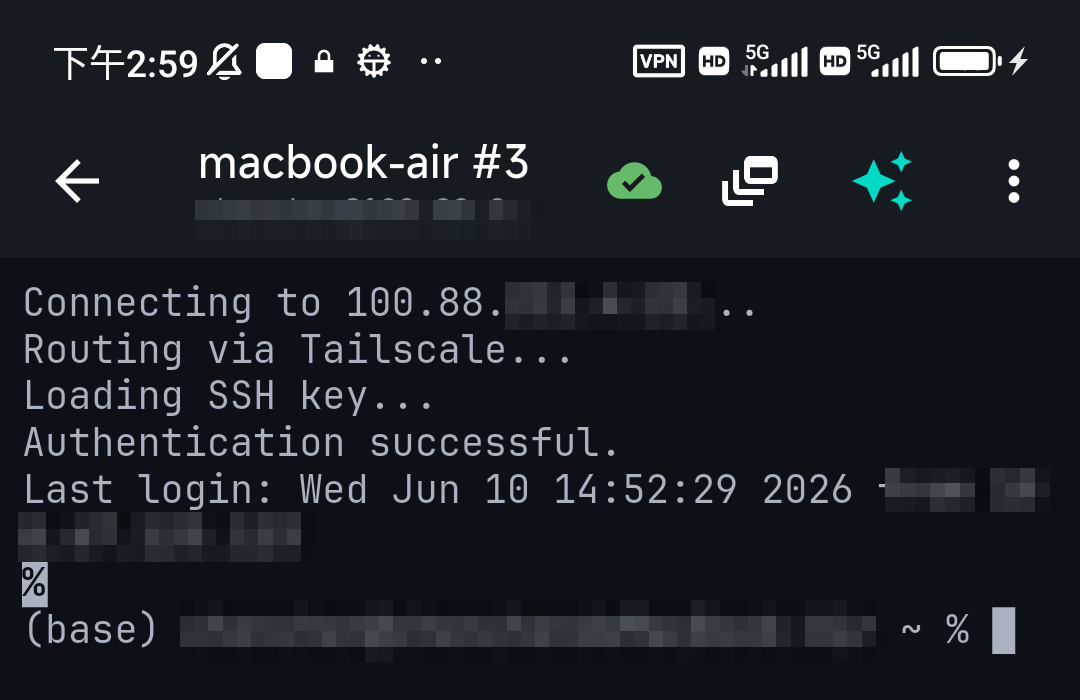
This is the main reason most people install it: SSH to a home machine while you're out, safely. With Tailscale on, point your SSH client at the server's tailnet address and connect as usual.
You can also skip the separate app entirely: TermAI has Tailscale built in, so it connects to your tailnet devices without installing or toggling the Tailscale app — one less thing to manage on the phone.
Exit nodes
An exit node routes all your internet traffic through one of your tailnet devices — useful for appearing to be on your home network, or for a trusted egress on public Wi-Fi. On iPhone, set one device as an exit node (from its own settings/admin console), then in the iOS Tailscale app pick it under Exit Node. Note this is different from just reaching your devices: an exit node sends everything out through that machine, so expect its upload speed to cap your browsing.
Does Tailscale drain iPhone battery?
In normal use the impact is small — Tailscale uses iOS's efficient on-demand VPN and isn't constantly transferring data. The two things that increase drain are: running as an exit node client (all traffic tunneled) and very chatty always-on connections. For typical "reach my server when I need it" use, leave it on; if you only SSH occasionally, toggling it on when needed is fine too.
FAQ
Is Tailscale free for personal use?
Yes — Tailscale has a free Personal plan that covers a generous number of devices, which is plenty for a homelab and a phone.
Do I need to open ports on my router?
No. That's the whole point — Tailscale connects your devices directly (or via an encrypted relay) without exposing anything to the public internet.
Can I SSH over Tailscale without the Tailscale app?
Yes, if your SSH client has Tailscale built in. TermAI does, so it reaches tailnet devices without the separate app installed.
Tailscale or WireGuard?
Tailscale is built on WireGuard and adds the key management and NAT traversal that make it easy. See Tailscale vs WireGuard.
Quick Facts
- Topic: Tailscale on iPhone — setup, SSH, exit nodes, battery
- Setup: install app, sign in, allow VPN config — devices appear by name
- Main use: reach private servers/SSH from anywhere, no port forwarding
- Battery: small in normal use; higher only as an exit-node client
- Built-in option: TermAI includes Tailscale — no separate app needed
Free on iOS and Android. 5 AI requests/day on the free tier, plus unlimited SSH/SFTP and built-in Tailscale.