The short answer
Termius and Termux get confused because the names rhyme, but they solve different problems. Termius is a managed SSH client — you add hosts and keys and connect to remote servers. Termux is a Linux environment that runs on your Android phone — a local shell with its own package manager, not primarily a way to reach other machines. So the real question isn't "which is better", it's "do I want to connect to servers, or run Linux locally on my phone?"
Connect to servers → a managed client (Termius, or TermAI). Run Linux locally on Android → Termux. And if you want both in one app on Android, that's the unusual case where TermAI fits, because its Android app ships a built-in local Linux terminal alongside the SSH client.
There's a second layer of confusion worth clearing up first, because four different tools have near-identical names: Termius, Termux, Terminus (now called Tabby) and Termix. They are unrelated projects by unrelated people. The table below tells you in one glance which one you actually meant.
Termius vs Terminus vs Termux vs Termix: which one did you mean?
If you searched "terminus vs termux" or "termius vs termix" and the results looked like they were describing four different apps, that's because they were. Here is the disambiguation:
| Name | What it actually is | Runs where | Cost / licence |
|---|---|---|---|
| Termius | Commercial managed SSH/SFTP client with host list, key storage and cross-device sync | iOS, Android, macOS, Windows, Linux | Free tier; Pro from $9.99/mo billed annually (about $19.99/mo month-to-month) |
| Termux | Android terminal emulator bundled with a full Linux userland and its own package manager | Android only | Free, open source (GPLv3) |
| Terminus | The old name of Tabby — a desktop terminal emulator that is also an SSH/serial client | Windows, macOS, Linux (desktop only) | Free, open source (MIT) |
| Termix | Self-hosted, web-based SSH and remote-desktop management platform you run on your own server | Browser (Docker host), plus native desktop/mobile clients | Free, open source, self-hosted |
| Nexterm | Self-hosted server management panel for SSH, VNC, RDP and SFTP | Browser (Docker host) | Free, open source (MIT), self-hosted |
Rule of thumb: Termius and TermAI are apps you install and log into. Termux is a Linux box inside your phone. Terminus/Tabby is a desktop terminal window. Termix and Nexterm are servers you host, and then reach through a browser.
Two more names that pollute these search results, so you don't waste time: "Terminus" is also an unrelated B2B marketing platform, and terminus is also the name of Pantheon's WordPress/Drupal command-line tool. Neither has anything to do with SSH clients.
What each one actually is
Termius is a polished SSH/SFTP client for iOS, Android, and desktop. It manages a list of hosts, stores your keys, syncs across devices, and connects you to remote machines. It does not give you a local Linux shell to run commands on the phone itself.
Termux is an Android terminal emulator bundled with a Linux environment. You pkg install packages, write scripts, and yes, you can install OpenSSH and SSH out from the command line — but you manage that yourself; there's no host list or key UI. It's free and open source, and Android-only.
On installing Termux in 2026: the official install docs still point at F-Droid and GitHub releases (github.com/termux/termux-app), where the stable build is 0.118.3 and 0.119.0 is in beta. The old Google Play listing was deprecated years ago; there is now a separate Play Store distribution maintained at github.com/termux-play-store, versioned by date rather than by 0.11x number, which folds the old Termux:Boot and Termux:Widget add-ons into the main app. The two builds are not interchangeable — most tutorials you'll find online assume the F-Droid/GitHub one. Whichever you pick, do not install a random "Termux" APK from a mirror site.
Side by side
| Termius | Termux | TermAI | |
|---|---|---|---|
| Type | Managed SSH client | Local Linux env | SSH client + local terminal |
| Connect to remote servers | ✅ managed | ⚠️ manual CLI | ✅ managed |
| Local Linux shell on phone | ❌ | ✅ | ✅ (Android, Alpine) |
| Package manager on device | ❌ | ✅ pkg / apt | ✅ apk (Alpine) |
| Platforms | iOS / Android / desktop | Android only | iOS / Android |
| AI assistant | Paid add-on | ❌ | ✅ built-in |
| Open source | ❌ | ✅ | ❌ |
| Price | Free tier; Pro $9.99/mo (annual) | Free | $2.99/mo (free tier) |
Termux vs Terminus (Tabby)
This pairing shows up a lot in search, and it's the one where the two tools overlap least. They don't run on the same kind of device.
- Termux runs on your Android phone or tablet. It gives you a Linux userland —
bash,git,python,ffmpeg,vim— executing natively on the device, no root required. There is no desktop version. - Terminus, renamed Tabby in 2021, runs on Windows, macOS and Linux desktops. It's a terminal emulator: tabs, panes, themes, a built-in SSH connection manager with SFTP, plus serial and Telnet. It does not give a phone anything, and it isn't a Linux distribution — it just draws terminals for shells that already exist on your machine.
So "Termux vs Terminus" is only a real decision if you're deciding where to work. On a phone: Termux (local Linux) or a mobile SSH client (Termius, TermAI). On a laptop: Tabby, or whatever terminal your OS ships. Nobody has to choose between them for the same job.
One genuine overlap: both can be your SSH front end. Tabby has a saved-host manager and SFTP built in, which makes it closer to Termius than to Termux in spirit — a free, open-source desktop alternative to Termius, minus the mobile apps and cross-device sync.
Terminus for Linux: what to actually install
Searching "Terminus for Linux" is confusing because of the rename. The current project is Tabby, at github.com/Eugeny/tabby, and its releases page publishes Linux builds as .deb, .rpm and AppImage for x64 and arm64. Installing a package named "terminus" from your distro's repositories will usually get you something else entirely — most commonly the Terminus font family (xfonts-terminus / terminus-font), which is a bitmap font, not a terminal app. If your goal was "a nicer terminal on Linux", install Tabby from its own releases rather than searching for the old name.
And to be explicit, because people ask: Termux is not available for Linux desktops, and it never will be. Termux exists to give Android something Linux desktops already have. On a Linux machine you already have a shell; there's nothing for Termux to add.
Termius vs Termix
Despite the one-letter difference, these are opposite philosophies. Termius is a subscription app you install on each device, with a hosted sync service. Termix is an open-source platform you self-host — typically as a Docker container on a home server, VPS or Proxmox box — and then reach through a browser or its client apps.
| Termius | Termix | |
|---|---|---|
| Model | Commercial SaaS app | Self-hosted, open source |
| Where credentials live | The vendor's sync service, in an encrypted vault | On the server you run |
| Setup effort | Install, sign in, done | Docker Compose, reverse proxy, backups — your job |
| Access from a new device | Install the app, sign in | Open a browser, or install a client app |
| Beyond SSH | SFTP, port forwarding, sync, team features | SSH terminal, tunnelling, file manager/editor; RDP, VNC and Telnet via its bundled Guacamole container |
| Cost | Free tier; Pro from $9.99/mo annually | Free — you pay for the hosting |
| Works with no server of your own | ✅ | ❌ needs a host |
Choose Termius if you want zero infrastructure, official mobile and desktop apps, and someone else responsible for uptime. Choose Termix if you already run a home lab, object to a subscription for SSH, or want your credential store on hardware you control. Termix is actively developed — 2026 releases have added things like Tailscale and WireGuard support, HashiCorp Vault SSH auth, Bitwarden SSH agent integration and WebAuthn passkeys — but it is still self-hosted software, which means you own the upgrades, the TLS certificate and the backups.
The honest caveat for phone users: a browser-based panel is a poor mobile SSH experience compared with a native app, which is why Termix ships client apps and why most people still keep a native client on the phone. If that's you, our roundup of Termius alternatives in 2026 covers the native options side by side.
Nexterm vs Termix
These two are genuine competitors — both are free, open-source, self-hosted server-management panels that you run in Docker and use from a browser. Picking between them comes down to what else is in your rack.
| Nexterm | Termix | |
|---|---|---|
| Licence | MIT | Open source (self-hosted) |
| Protocols | SSH, VNC, RDP, SFTP | SSH, SFTP, plus RDP/VNC/Telnet through its Guacamole container |
| Standout feature | Proxmox LXC/QEMU management and one-click Docker app deployment | SSH-first workflow: tunnelling, remote file editing, credential integrations |
| Access control | Organisations, 2FA, OIDC SSO | User accounts, passkeys, external secret stores |
| Clients | Browser | Browser plus native desktop and mobile builds |
| Default port | 6989 | Set by your Compose file |
Pick Nexterm if you run Proxmox or a mixed Windows-plus-Linux fleet: native RDP and VNC alongside Proxmox container management, with organisation-level separation, is the thing it does that Termix doesn't. Pick Termix if your work is overwhelmingly SSH and you want the terminal, tunnels and file editing to feel first-class, with real apps rather than only a browser tab.
What neither gives you is an offline-capable phone client. Both need their server reachable — if the box hosting the panel is the box that's down, you're locked out. That's the standard argument for keeping a plain SSH client on your phone as a break-glass path, even when a panel is your daily driver.
Termux vs a terminal (and Android's built-in Linux Terminal)
"Termux vs terminal" is really two questions.
1. Termux vs a plain terminal emulator. A terminal emulator is only the window: it draws text, handles the keyboard, and runs whatever shell it's pointed at. On stock Android there is barely any shell worth pointing it at — the system sh has almost no tooling. Termux is a terminal emulator plus a complete Linux userland: a package manager with roughly two thousand packages, a writable home directory, and compilers. That's the whole difference. Apps like ConnectBot are terminal emulators wired to SSH, not local Linux environments; see ConnectBot vs Termux for that specific comparison.
2. Termux vs Android's own Linux Terminal. Android 16 ships a Linux Terminal app that boots a real Debian virtual machine using the Android Virtualization Framework. It is not the same thing as Termux, and the trade-offs are clear:
- Termux runs ARM64 binaries natively with no virtualisation layer, so it's lighter and faster to start, it can talk to Android itself through the Termux:API tools, and it reaches your device storage. The cost is that its packages are built specifically for Termux — not stock Debian or Ubuntu ones.
- The Linux Terminal VM gives you the real Debian archive, systemd and even Docker, with hardware-level isolation. The cost is virtualisation overhead, a sandbox that can't freely touch your phone's files or Android APIs, and availability that in practice is limited — the full experience has centred on Pixel devices, and some manufacturers ship with AVF disabled.
If you want packages Termux doesn't build, or systemd, the VM wins. If you want a fast pocket shell that integrates with the phone, Termux still wins. We go deeper on all the options in how to run Linux on Android.
When to choose Termius
Pick Termius (or any managed SSH client) when your job is reaching other machines: servers, a Raspberry Pi, a VPS, a work box. You want a saved host list, stored keys, SFTP, and sync — not a Linux sandbox on the phone. If you also need a desktop app on Windows or Linux, Termius has one; that's a real point in its favor.
Price check for 2026: Termius still has a free tier, and Pro is listed at $9.99/month billed annually, with month-to-month costing roughly twice that. The AI features are part of the paid tiers, not the free one.
When to choose Termux
Pick Termux when you want a Linux computer in your pocket: running scripts locally, learning the shell, using packages like git, python, or ffmpeg directly on Android, automating tasks on the device. SSH is possible but secondary, and it's Android-only with manual setup. If that's your use case, Termux is excellent and free.
Two things to know before committing. First, Termux is a local environment, so if your phone is the only place your keys live, losing the phone loses the setup — back up ~/.ssh deliberately. Second, using Termux as your SSH client means typing ssh -i ~/.ssh/id_ed25519 user@host -p 2222 on a phone keyboard every time, unless you write out an ~/.ssh/config yourself. Most people who "SSH from Termux" eventually either write that config or install a managed client next to it.
Where TermAI fits: it does both (on Android)
TermAI is normally compared as an SSH client, but on Android it's unusual because it ships both sides of this comparison: a managed SSH client for your servers, and a built-in local Linux terminal (Alpine) for running commands on the phone itself — no root, no separate install. For the full feature-by-feature breakdown against Termius, see TermAI vs Termius.
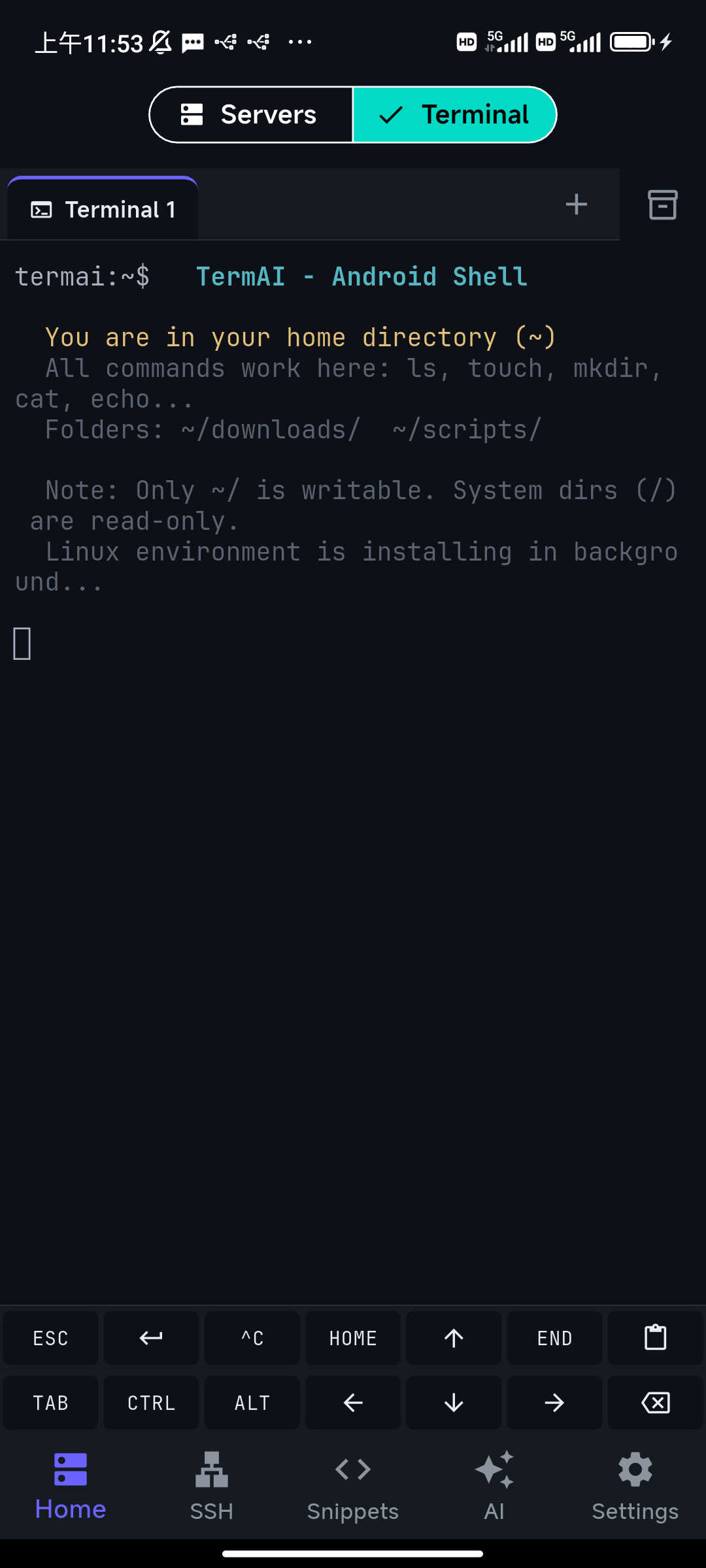
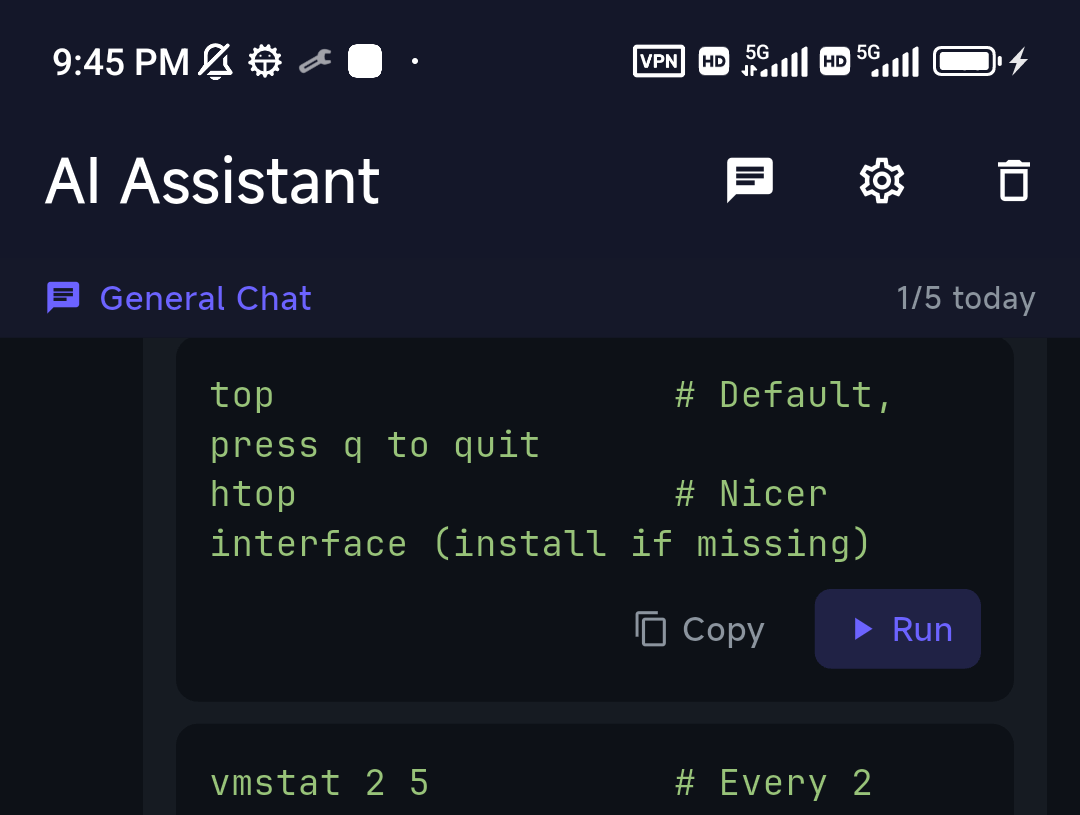
On top of that, TermAI adds an AI assistant in the terminal and Tailscale built in. So if the reason you were weighing Termius against Termux is "I'm not sure if I want remote or local", TermAI is the option that doesn't make you choose — with the caveat that the local-Linux side is Android-only, and Termux still wins for a deep, fully customizable local environment.
How to decide in one line
- I need to manage and connect to remote servers → Termius or TermAI.
- I want a local Linux environment on Android → Termux.
- I want both in one app (Android), with AI and Tailscale → TermAI.
- I need a desktop app too → Termius, or Tabby (the app formerly called Terminus) if you want it free and open source.
- I want a deep, fully customizable local Linux setup → Termux.
- I want to self-host my own SSH panel → Termix, or Nexterm if you also need RDP/VNC and Proxmox.
- I want stock Debian, systemd or Docker on an Android phone → Android 16's Linux Terminal, where your device supports it.
FAQ
Is Termux an SSH client?
Not really. Termux is a local Linux environment; you can install OpenSSH and SSH from its command line, but it has no managed host list or key UI like a dedicated SSH client.
Can you SSH with Termux?
Yes — pkg install openssh and use the ssh command. You manage hosts and keys manually on the command line, or by hand-writing an ~/.ssh/config.
Is Termux better than Termius?
They aren't competitors. Termux is better for running Linux locally on Android; Termius is better for managing connections to remote servers. Choose by whether your work is local or remote.
What is the difference between Termius and Terminus?
Termius is a commercial cross-platform SSH client with mobile apps and sync. Terminus is the former name of Tabby, a free open-source desktop terminal emulator that also does SSH. Different projects, different companies, no mobile apps for Tabby. If you searched "Terminus" hoping for a phone SSH client, you probably wanted Termius or TermAI.
Is Termius the same as Termux?
No. One letter apart, entirely different tools: Termius connects you to remote servers, Termux gives you a Linux environment on the Android device itself. Neither company is related to the other.
What is Termix, and is it a good Termius alternative?
Termix is a free, open-source, self-hosted SSH and remote-desktop management platform that you run yourself (usually in Docker) and use from a browser or its client apps. It's a good Termius alternative if you already run a server and would rather not pay a subscription; it's a bad one if you want something that just works on a phone with no infrastructure.
Nexterm vs Termix — which should I self-host?
Nexterm if you need RDP and VNC as first-class citizens, Proxmox LXC/QEMU management, or organisation-level user separation with OIDC SSO. Termix if your work is SSH-first and you want tunnelling, remote file editing and native desktop/mobile clients. Both are free, open source and Docker-deployed, so trying both costs an evening.
Is Terminus available for Linux?
Yes, under its current name: Tabby publishes Linux builds as .deb, .rpm and AppImage on its GitHub releases page. Be careful installing a distro package called "terminus" — that's usually the Terminus bitmap font, not the terminal.
Can I run Termux on Linux or Windows?
No. Termux is Android-only. On a Linux desktop you already have a native shell; on Windows the equivalent is WSL.
What's the difference between Termux and a terminal emulator?
A terminal emulator only draws the terminal window and runs an existing shell. Termux is a terminal emulator plus a full Linux userland — package manager, home directory, compilers — which is what makes it useful on Android, where the stock shell is nearly empty.
Termux vs Android 16's Linux Terminal — which is better?
The built-in Linux Terminal runs a real Debian virtual machine, so you get the full Debian archive, systemd and Docker, with strong isolation. Termux runs natively with no VM overhead, starts faster, reaches your device storage and can call Android APIs through Termux:API. Pick the VM for stock Debian packages, Termux for a fast pocket shell that's integrated with the phone. Availability of the VM is also uneven across manufacturers.
Is there a Termux for iPhone?
No. Termux is Android-only. On iOS, the closest local-shell options are sandboxed apps; for remote SSH on iPhone, use a managed client like TermAI or Blink.
Is Termux still on the Play Store?
The original Play Store listing was deprecated, and the official install docs point at F-Droid and GitHub. There is now a separate Play Store distribution maintained under the termux-play-store GitHub organisation, versioned by date; it isn't the same build as the F-Droid one, and most guides online assume F-Droid.
How much does Termius cost in 2026?
There's a free tier, and Pro is listed at $9.99/month billed annually — roughly $19.99/month if you pay monthly. Team and business plans cost more per seat. Termux is free and open source; TermAI is $2.99/month with a free tier.
Is Termux safe?
The builds from F-Droid and the official GitHub releases are, and it's open source so the code is auditable. The risk is elsewhere: mirror sites redistributing modified APKs, and tutorials that tell you to pipe a random script into your shell. Install from an official source and read scripts before running them.
Quick Facts
- Topic: Termius vs Termux vs Terminus vs Termix — which one you actually need
- Key difference: Termius is a managed SSH client (connect to servers); Termux is a local Linux environment on Android
- They're not competitors: choose by local vs remote, not "which is better"
- Terminus: the old name of Tabby, a free open-source desktop terminal and SSH client for Windows, macOS and Linux
- Termix / Nexterm: free, open-source, self-hosted server-management panels you run in Docker — Nexterm adds RDP/VNC and Proxmox, Termix is SSH-first with native clients
- Termux: free, Android-only, install from F-Droid or GitHub; SSH possible but manual
- Termius pricing (2026): free tier, Pro from $9.99/mo billed annually
- TermAI: does both on Android — managed SSH client + built-in local Alpine terminal, plus AI and Tailscale, $2.99/mo
- Need a desktop app: Termius or Tabby; need a deep local Linux setup: Termux
Free on iOS and Android. 5 AI requests/day on the free tier, plus unlimited SSH/SFTP and built-in Tailscale.