The short answer
To reach your home server from anywhere, you have three real options: port forwarding (open a port on your router — simple but exposes you to the internet), a mesh VPN like Tailscale (each device gets a stable private address, nothing exposed — the recommended modern choice), or a reverse tunnel (for tricky networks behind CGNAT). For almost everyone in 2026 the answer is Tailscale: it's free for personal use, needs no open ports, and works through CGNAT and mobile networks. This guide compares all three and shows the Tailscale path end to end, including from your phone.
Why it's not just "type the IP"
Your home server's address — 192.168.x.x or raspberrypi.local — only exists inside your home network. From cellular or a café, packets to it go nowhere (a guaranteed timeout). Your home also has a public IP, but it changes (dynamic IP) and putting SSH directly on it invites the entire internet's bots to knock. So the real question is: how do you get a stable, private, secure path in?
The three options compared
| Method | Exposure | Works behind CGNAT? | Effort |
|---|---|---|---|
| Tailscale (mesh VPN) | None — nothing public | ✅ Yes | Low |
| Port forwarding + DDNS | SSH exposed to internet | ❌ No | Medium |
| Reverse tunnel (e.g. via a VPS) | Only the VPS | ✅ Yes | High |
The recommended way: Tailscale
Tailscale builds a private mesh between your devices. Your home server and your phone each get a stable 100.x address that works from anywhere — no open ports, no dynamic-DNS, encrypted end to end. Setup:
- On the home server: install Tailscale and bring it up:
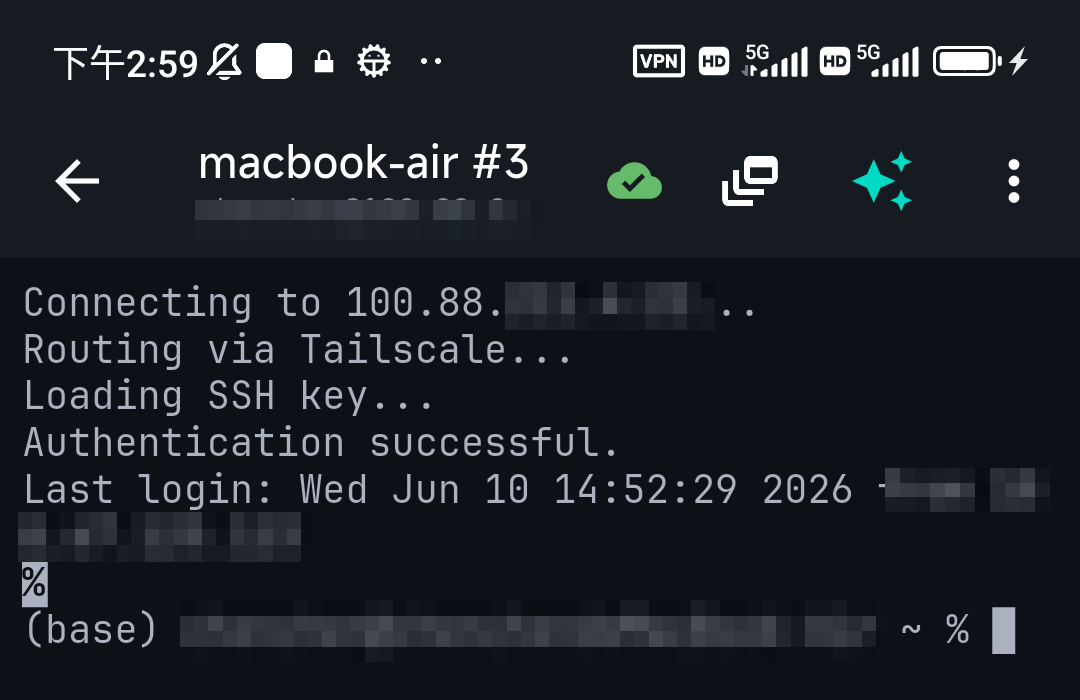
curl -fsSL https://tailscale.com/install.sh | sh sudo tailscale up - On your phone: join the same tailnet. In a client with Tailscale built in (like TermAI) you add your tailnet and the server shows up in your device list — no separate VPN app to install.
- Connect: SSH to the server's
100.xaddress (or its MagicDNS name). It works identically on home Wi-Fi and cellular.
If you use port forwarding instead
Port forwarding works but trades safety for simplicity — you're putting SSH on the public internet. If you go this route, do it carefully: keys only, no passwords, disable root login, run fail2ban, and consider moving off port 22 to cut log noise. You'll also need dynamic DNS since your home IP changes. It's more moving parts and more risk than Tailscale for the same result.
Doing it all from your phone
The nice part of the Tailscale approach is the phone side needs nothing special once the server is on the tailnet — a client with Tailscale built in lists your home devices and connects with a tap. From there you have your full server at your fingertips, and if you're not sure of a command, the AI assistant can suggest it. See the full Tailscale-on-mobile setup or self-hosting from your phone.
FAQ
How do I access my home server from anywhere?
Easiest and safest: put it and your phone/laptop on Tailscale (a free mesh VPN), then connect to its stable 100.x address from any network. Alternatives are port forwarding (exposes SSH publicly) or a reverse tunnel through a VPS.
Is port forwarding safe?
It works but exposes SSH to the whole internet. If you must, use keys only, disable root, run fail2ban, and add dynamic DNS. Tailscale avoids the exposure entirely.
Does this work behind CGNAT?
Tailscale and reverse tunnels work behind CGNAT; plain port forwarding does not, because you don't control the carrier's NAT.
Can I do it without installing a VPN app on my phone?
Yes — a client with Tailscale built in (like TermAI) handles the phone side, so there's no separate VPN app to manage.
Quick Facts
- Best method: Tailscale mesh VPN — stable private address, no open ports, free for personal use
- Why not just the IP: LAN IPs don't exist outside home; public IP changes and exposing SSH invites bots
- Port forwarding: works but exposes SSH — keys only, no root, fail2ban, DDNS
- CGNAT: Tailscale and reverse tunnels work; plain port forwarding doesn't
- From a phone: a client with built-in Tailscale (TermAI) needs no separate VPN app
Free on iOS and Android. 5 AI requests/day on the free tier, plus unlimited SSH/SFTP and built-in Tailscale.