What "Connection timed out" means
A timeout means your packets got no answer at all — they were dropped somewhere, or sent to an address where nothing exists. That's the key difference from Connection refused (an active "nothing listening here" reply): refused proves the machine is reachable; timed out proves nothing is. The causes are all variations of "your traffic can't reach the box": wrong IP, host down, a firewall silently dropping, or — the number one mobile case — trying to reach a private address from outside its network.
You'll see it worded slightly differently depending on your client, but it is the same TCP failure every time:
ssh: connect to host 192.168.1.42 port 22: Connection timed out    # Linux, Android
ssh: connect to host example.com port 22: Operation timed out      # macOS / iOS wording
Network error: Connection timed out                                 # PuTTY on Windows
Note where it fails: the error appears before any banner, before any password or key prompt. Nothing about your username, key, or password can cause it. If you got as far as a prompt and then failed, you want Permission denied (publickey) instead; if the session opened and then died, see Broken pipe and the idle-timeout section below.
The causes, most likely first
| # | Cause | Typical situation | Fastest check |
|---|---|---|---|
| 1 | Private IP from outside | Works on home Wi-Fi, times out on cellular | Is the address 192.168.x / 10.x / .local? |
| 2 | Wrong IP / IP changed | DHCP gave the box a new address | Router device list, hostname -I on the box |
| 3 | Host is down / asleep | Laptop lid closed, Pi lost power | ping from the same LAN |
| 4 | Cloud firewall set to DROP | EC2 security group without an SSH rule | Provider dashboard, not the OS |
| 5 | Network blocks the port | Corporate/hotel/school networks blocking 22 outbound | Retry on cellular |
| 6 | Host firewall DROP policy | ufw/iptables default deny, no SSH allow | sudo ufw status on the box |
| 7 | DNS points at a stale address | Hostname times out, raw IP works | dig +short host vs the real IP |
| 8 | Broken IPv6 path | Host has an AAAA record you can't route to | ssh -4 user@host succeeds |
| 9 | Routing/NAT gap (cloud) | No internet gateway, NACL, or wrong subnet | Route table + NACL rules |
1 — The classic: "works at home, times out outside"
Addresses like 192.168.x.x, 10.x.x.x, 172.16–31.x.x, or raspberrypi.local only exist inside your home network. From cellular or any other network, packets to them go nowhere — a guaranteed timeout. The .local case is even narrower: mDNS names resolve only on the same LAN segment, so they fail on many guest and corporate Wi-Fi networks too.
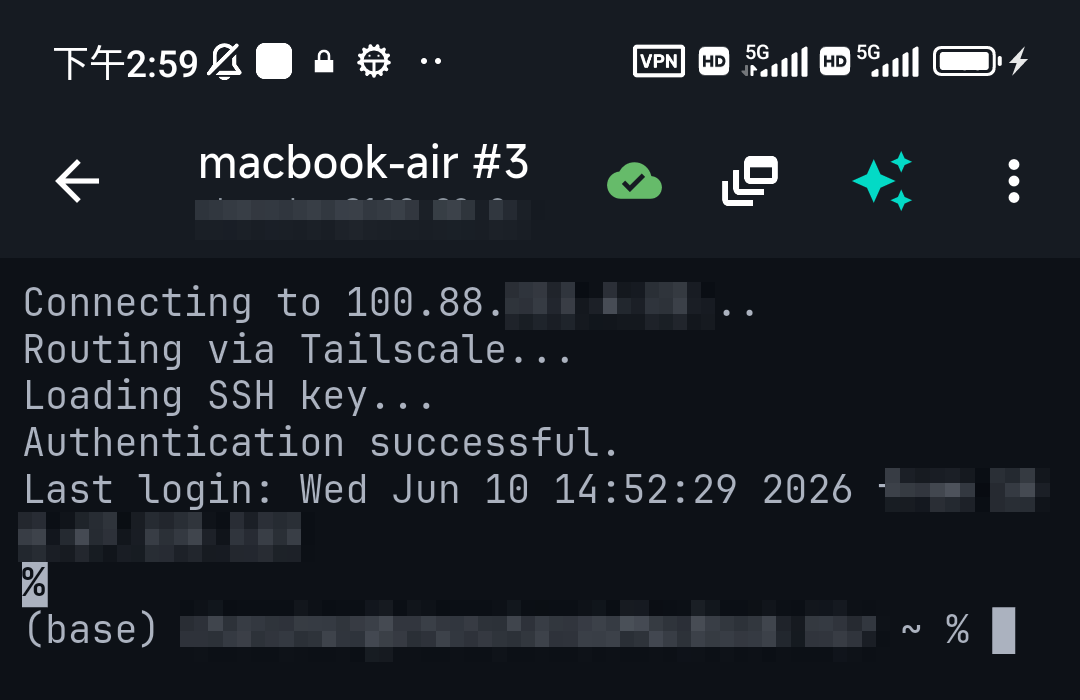
The clean fix is not port forwarding (exposing SSH to the internet, and often impossible anyway — many home ISPs and mobile carriers put customers behind CGNAT, where you have no public address to forward). It's a mesh VPN: put the box and your phone on Tailscale and connect to its stable private 100.x address from anywhere. TermAI has Tailscale built in, so the phone side needs no extra app. Full walkthrough: Tailscale SSH on mobile and reaching a home server from anywhere.
2 — Verify the IP, the name, and that the host is up
On the same network, ping the address. No reply usually means a wrong/changed IP or a powered-off box — check the router's device list, or on the box run hostname -I. Remember sleep policies: a Mac with the lid closed and "Prevent sleep" off won't answer; a Pi with a flaky power supply may have died quietly; a laptop that joined a different Wi-Fi network is on a different subnet entirely.
Two name-resolution traps produce timeouts that look like network failures:
- Stale DNS. If
ssh 203.0.113.10works butssh myserver.example.comtimes out, DNS is handing you an old address. Comparedig +short myserver.example.comwith the real IP, then flush your resolver cache or fix the record. - IPv6 that doesn't route. If the host publishes an AAAA record and your network's IPv6 is broken or filtered, SSH tries v6 first and stalls.
ssh -4 user@hostforces IPv4 — if that connects instantly, you've found it. Make it permanent withAddressFamily inetin your SSH config.
3 — Firewalls that drop instead of reject
This is the single most useful distinction in the whole error. A firewall set to REJECT sends back a refusal, so you get "Connection refused" fast. A firewall set to DROP says nothing at all, so your client waits out the full TCP retry sequence and reports "Connection timed out". Cloud providers drop by default — which is why a brand-new VPS with no SSH rule hangs rather than refusing.
On the box itself:
sudo ufw status verbose          # Ubuntu/Debian: is 22/tcp ALLOW IN?
sudo ufw allow 22/tcp

sudo firewall-cmd --list-all     # RHEL/Fedora/Rocky
sudo firewall-cmd --permanent --add-service=ssh && sudo firewall-cmd --reload

sudo iptables -L INPUT -n --line-numbers | head    # policy DROP with no ssh ACCEPT?
Order matters: check the provider firewall before the OS one, because a cloud security group blocks the packet before the OS ever sees it — so ufw status can look perfectly healthy while nothing arrives.
4 — The network you're on blocks outbound 22
Some corporate, school, hotel, and airport networks block outbound port 22. Test by switching to cellular (or a phone hotspot): if it suddenly works, the network was the problem, not your server. Long-term options, best first:
- Tailscale — traverses these networks without opening or requesting any port; nothing to configure on the restrictive network's side.
- Run sshd on 443 as well as 22 on a server you control. Add
Port 22andPort 443tosshd_config(only if nothing else uses 443 on that host), open it in the firewall, restart sshd. Most filtered networks let 443 through. Related: changing the SSH port. - An SSH-over-HTTPS jump host you already reach, then hop onward with a tunnel.
Sanity check before you rearchitect anything: nc -vz your-server 443 and nc -vz your-server 22 from the same network. If 443 answers and 22 hangs, the network is filtering by port — conclusively.
Timed out on a VPS: the AWS / cloud checklist
"EC2 SSH times out" is its own genre of the error, and almost always network configuration rather than the instance. Work down this list in order — the first three cover the large majority:
- Security group inbound rule. Does the group attached to the instance allow TCP 22 from your current public IP (or 0.0.0.0/0 while testing)? Home IPs change; a rule pinned to yesterday's address gives exactly this timeout.
- Public address. Are you connecting to the public IPv4/Elastic IP, not the private 172.31.x address? The private one only works from inside the VPC — same class of mistake as cause #1 above.
- Route to the internet. The subnet's route table needs
0.0.0.0/0pointing at an internet gateway, and the VPC needs that gateway attached. A "private subnet" instance is unreachable by design. - Network ACLs. NACLs are stateless: you need an inbound rule for 22 and an outbound rule for the ephemeral return ports (1024–65535). One-sided NACLs are a notorious silent-drop source.
- Instance health. Check that both status checks pass. An instance that failed to boot, filled its disk, or is thrashing on memory will not answer TCP.
- OS firewall. Only after the above:
ufw/firewalld/iptableson the instance itself.
When you're locked out, AWS gives you doors that don't use port 22 — EC2 Instance Connect, Session Manager, and the serial console — plus VPC Reachability Analyzer, which traces exactly which hop drops the packet. Azure, Google Cloud, DigitalOcean, Hetzner, and Oracle Cloud all have equivalents: a browser/serial console plus a provider-level firewall you must edit separately from the OS. Oracle Cloud is a frequent offender because its images ship with restrictive iptables rules in addition to the cloud security list. More phone-side context: managing a VPS from your phone.
"github.com port 22: Connection timed out" on git push or clone
Same error, very specific cause: your network blocks outbound 22, and Git is trying to reach GitHub over SSH. GitHub publishes an alternate SSH endpoint on the HTTPS port, which sails through nearly every restrictive network. Test it first:
ssh -T -p 443 [email protected]If that greets you by username, make it permanent in ~/.ssh/config:
Host github.com
  Hostname ssh.github.com
  Port 443
  User git
Two notes: the hostname is ssh.github.com, not github.com — port 443 on github.com itself is the website. And you'll get a one-time host-key prompt for the new host, which is expected; if it looks wrong to you, see host key verification. Switching the remote to HTTPS (git remote set-url origin https://github.com/...) also works but changes how you authenticate. GitLab and Bitbucket offer similar alternate-port endpoints — check their docs for the current hostname rather than guessing.
Different problem: the session times out after a few minutes
If SSH connects fine and then freezes or drops after a period of inactivity, that is not this error — nothing timed out at connect time. Two mechanisms cause it, and the fix depends on which:
- A NAT/firewall device forgetting your idle connection. Common on mobile networks and cheap routers. Fix from the client with keepalives in
~/.ssh/config:
That sends a small packet every 30s so the NAT entry never goes stale, and gives up after ~3 minutes of genuine silence.Host * ServerAliveInterval 30 ServerAliveCountMax 6 - The server deliberately disconnecting you. In
/etc/ssh/sshd_config, the effective idle limit isClientAliveInterval × ClientAliveCountMax— e.g.300×3disconnects after about 15 minutes. Some hosts also set a shell-levelTMOUT. Both are server-side policy; raising them needs root on the box.
On a phone, where you're switching networks and locking the screen constantly, keepalives only go so far — a roaming handoff breaks the TCP connection outright. That's what Mosh was built for, and why long jobs belong in tmux or nohup so a dropped session doesn't kill them. Deeper dive: Write failed: Broken pipe.
The same error on each platform
- macOS / iOS — worded "Operation timed out". Identical meaning. macOS has no inbound firewall issue here (you're the client), but corporate VPN split-tunnel profiles and per-app content filters routinely eat outbound 22; try with the VPN off.
- Windows (PuTTY) — "Network error: Connection timed out", shown before any credential prompt, so it can never be a password problem. Windows' own OpenSSH client (
sshin PowerShell) gives the standard wording. Third-party antivirus/endpoint suites are a real cause on Windows: they filter outbound connections independently of Windows Defender Firewall. - Android — standard OpenSSH wording. If it works on Wi-Fi and times out on mobile data, that's cause #1, not the app. Note that battery optimizers can freeze a backgrounded client, which looks like a hang rather than a timeout.
- iPhone / iPad — same. iOS Low Data Mode and Lockdown Mode change networking behaviour; if a connection started failing "for no reason", check whether either got switched on. See SSH from iPhone.
- Raspberry Pi as the target — a Pi that never joined Wi-Fi is invisible, so you get a timeout, not a refusal. A Pi that is on the network but has SSH disabled (the default on Raspberry Pi OS) gives you refused instead. That difference tells you whether to go fix the network or plug in a keyboard: enabling SSH on a Pi.
A 60-second diagnosis
ping HOST                    # any reply? host exists and is reachable
nc -vz HOST 22               # "succeeded" / "refused" / hangs = dropped
nc -vz HOST 443              # 443 works but 22 hangs -> port filtering
ssh -vvv -o ConnectTimeout=5 user@HOST   # where exactly does it stall?
traceroute HOST              # how far do packets get before dying
Read the verbose output by where it stops, not by the last error line:
- Stalls at
Connecting to HOST port 22→ TCP never completed: this article's problem (routing, firewall, host down). - Reaches
Connection establishedthen hangs → you got through; suspect a hung sshd, an overloaded box, or reverse-DNS lookups on the server (UseDNS no). - Reaches a banner and then fails → not a timeout at all; it's an auth or algorithm problem.
ConnectTimeout=5 is worth keeping in your config permanently — the OS default can hang for over a minute per attempt, which makes iterating on the problem miserable. Note that ping failing is suggestive but not proof: plenty of cloud hosts drop ICMP while happily accepting TCP, so always confirm with nc.
From a phone, run these from any box you can reach on that network — or ask TermAI's assistant for the exact probe command and run it there. Describing the symptom in plain words ("check whether 192.168.1.42 is answering on port 22 from here") gets you the right invocation without remembering nc flags.
Timed out vs refused vs closed vs denied
| Error | How far you got | Where to look |
|---|---|---|
| Connection timed out | No response at all | Address, routing, DROP firewall (this article) |
| Connection refused | Machine answered "nothing here" | sshd not running, wrong port, REJECT rule |
| Connection closed by remote host | sshd answered, then hung up | fail2ban, MaxStartups, host limits |
| Permission denied (publickey) | Fully connected, auth failed | Keys, permissions, authorized_keys |
| Broken pipe | Session worked, then died | Idle timeouts, network change (see above) |
All of them, in one place: the SSH troubleshooting index.
FAQ
What does "ssh: connect to host port 22: Connection timed out" mean?
Your SSH client sent TCP packets to that address on port 22 and got no reply within the timeout. Something between you and the server dropped them silently, the address is wrong, or the machine is off. It happens before authentication, so it is never a key or password problem.
How do I fix SSH connection timed out?
In order: confirm you're using an address reachable from your current network (a 192.168.x LAN IP is not, from outside); ping and nc -vz host 22 to see whether anything answers; check the cloud provider's security group before the OS firewall; then check ufw/firewalld on the box; then test from cellular to rule out your local network blocking port 22.
Why does SSH work at home but time out on mobile data?
You're connecting to a private LAN address that doesn't exist outside your home network. Use Tailscale (built into TermAI) to give the box a stable address reachable from anywhere — no port forwarding, and it works even behind carrier-grade NAT.
What's the difference between "connection timed out" and "connection refused"?
Timed out = no answer at all (unreachable, dropped, or wrong address). Refused = the machine answered but nothing listens on that port. Refused is actually the better news: it proves you reached the right machine.
Why does my VPS/EC2 time out on port 22?
Most often the provider's security group or cloud firewall has no inbound SSH rule, so traffic is dropped before the OS sees it. Next most common: you're using the private IP instead of the public/Elastic one, the subnet has no route to an internet gateway, or a stateless NACL allows inbound 22 but not the outbound ephemeral ports.
Why does "git clone" time out on github.com port 22?
Your network blocks outbound 22. Test ssh -T -p 443 [email protected]; if that works, add a Host github.com block to ~/.ssh/config with Hostname ssh.github.com and Port 443.
Is "Operation timed out" different from "Connection timed out"?
No — it's just the macOS and iOS wording for the same TCP failure. Troubleshoot it identically.
Why does my SSH session time out after a few minutes of inactivity?
That's a different problem: an idle NAT/firewall entry expiring, or the server's ClientAliveInterval × ClientAliveCountMax policy disconnecting you. Add ServerAliveInterval 30 to your client config; run long jobs under tmux so a drop doesn't kill them.
How do I increase the SSH connection timeout?ssh -o ConnectTimeout=30 user@host, or a ConnectTimeout line in ~/.ssh/config. This only changes how long you wait before giving up — it fixes nothing. Shortening it (ConnectTimeout=5) is usually more useful while debugging.
Ping works but SSH times out — what now?
The host is up and routable, so it's port-level filtering: a DROP rule on the box, a cloud security group, or your local network blocking 22 outbound. Compare nc -vz host 22 with nc -vz host 443 to tell "this port" from "this host" apart.
SSH times out but only on my work/hotel Wi-Fi. Can I get around it without changing the server?
Yes — Tailscale connects without needing any inbound port, so restrictive networks don't have a port to block. Otherwise you need cooperation from the server side (an sshd listening on 443).
Does a timeout ever mean my SSH key is wrong?
Never. Key, password, and username problems all happen after the TCP connection succeeds and produce Permission denied instead.
Quick Facts
- Meaning: packets got no reply — unreachable host, dropped traffic, or wrong address (pre-authentication, never a key problem)
- #1 mobile cause: private LAN IP from outside → use Tailscale, not port forwarding
- Cloud cause: security group DROP, private-IP-instead-of-public, or missing internet gateway route — check the provider dashboard before the OS firewall
- GitHub cause: outbound 22 blocked →
ssh.github.comon port 443 - Diagnose:
nc -vz host 22vsnc -vz host 443, thenssh -vvv -o ConnectTimeout=5— hang = dropped, refused = see the refused guide - Not this error: sessions dropping after idle time →
ServerAliveInterval/ClientAliveInterval
Free on iOS and Android. 5 AI requests/day on the free tier, plus unlimited SSH/SFTP and built-in Tailscale.